Spanish English Translator
- 4.4
- Rating
- 1.00M
- Installs
- Free
- Price
 Analysis by App-foxy
I have always liked having a small translation tool available for the moments when opening a full language-learning platform feels excessive. Spanish English Translator, developed by HeapSol Technologies, Inc, takes that focused approach: it is a free Books & Reference app built for moving between English and Spanish, with offline use as its central practical advantage. After spending time with it, I see it as a useful companion for travelers, students, families, and anyone who regularly encounters short phrases in the other language.
The app is not trying to replace a complete course, a professional interpreter, or a detailed bilingual dictionary. Its value is in reducing friction. You choose the direction, enter a word or phrase, and use the result immediately. That simplicity is also its main limitation, because people who need deep grammar explanations, conversation practice, or highly specialized terminology will eventually need another resource.
How the translator feels in everyday use
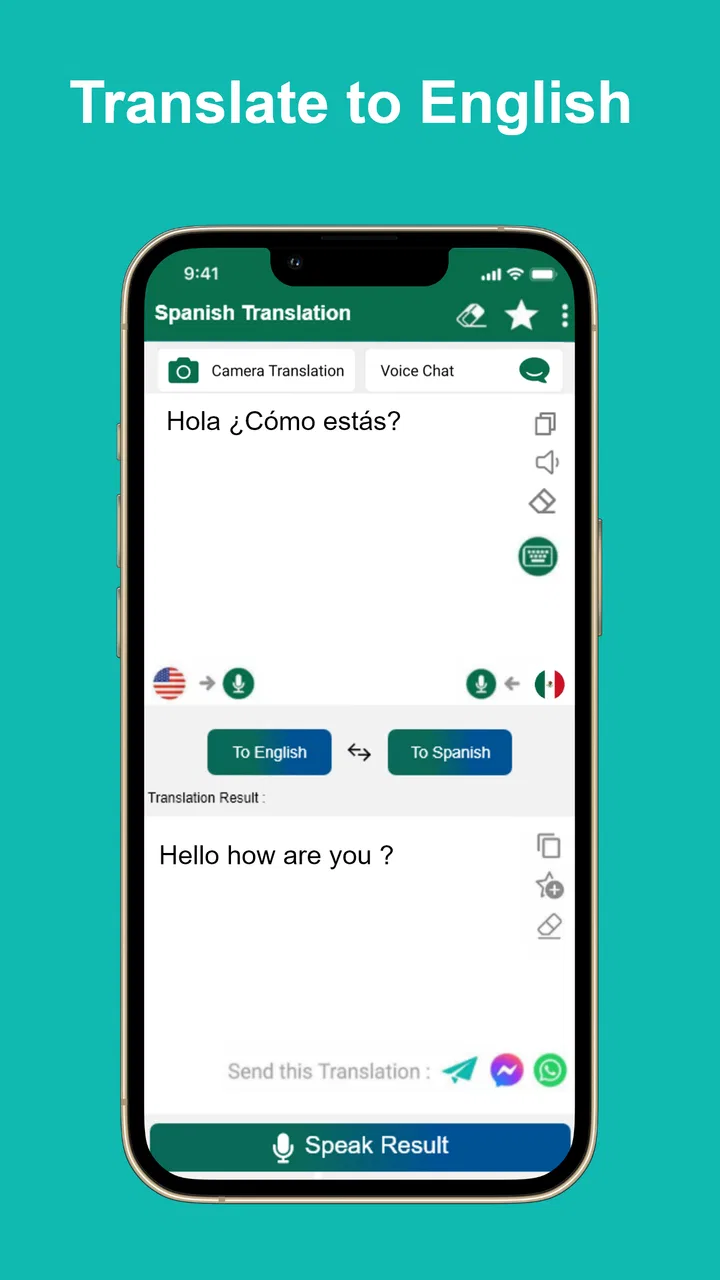
The first thing I noticed is how clearly the app’s purpose comes through. The store presents it as a Spanish Translator, but the useful point is that it works in both directions: English to Spanish and Spanish to English. That makes it more practical than an app designed only for learners of Spanish, since a Spanish speaker can use it to understand English just as easily.
You May Also Like

 Blood Strike: 2.5 Anniversary
Blood Strike’s Loadouts Turn Every Drop Into a Tactical Gamble
A close look at Blood Strike’s custom loadouts: how fast access to signature weapons reshapes its battle royale rhythm, rewards preparation, and narrows the gap between fights.

 Pandora - Music & Podcasts
Pandora’s Music Is Easy to Start, but Harder to Recover
Pandora’s strength is its low-effort path from a seed to a station. Its weak spot is how much confidence it asks you to place in connection, setup, and quiet recovery.

 8 Ball Pool
 Is Built on Rivalries, Rematches, and Routine
A close look at the rivalries, rematches, shared routines, and unanswered safety questions that turn a quick pool match into a persistent mobile community.

 Samsung Music
’s Quiet Strength Is Playing What You Already Own
Its reach comes less from spectacle than from dependable access to a personal library. That simplicity is both the app’s strongest retention engine and its ceiling.

 AccuWeather: Weather Radar
AccuWeather Review: A Quick, Clear Forecast for Everyday Decisions
For everyday plans, the best forecast is the one you can understand quickly. AccuWeather makes rain timing, radar, and local conditions easy to act on, with a few trade-offs.

 Hill Climb Racing
Why Hill Climb Racing Still Turns Crashes Into One More Run
A tiny car, a bumpy hill and one more upgrade: Hill Climb Racing keeps resurfacing because its simple chaos makes every near-miss feel personal.
More From Our News Desk



For a quick lookup, I would use it much like a pocket reference book. I can type a word, paste a short sentence, or switch the translation direction when the conversation changes. That last step matters more than it sounds. In a real exchange, I may first need to understand a message written in Spanish and then prepare a reply in English. A two-way tool is more convenient than maintaining separate references for each task.
The offline focus is particularly helpful in places where a connection is unreliable. A traveler arriving at an airport, a student working on a train, or someone trying to read a menu in an area with weak reception can still consult the app. Its strongest practical quality is dependable access to basic translation when connectivity is not something I want to think about. I would still check important wording carefully, but the ability to work without depending on a live connection makes it easier to keep the app ready for spontaneous situations.
A realistic example is a hotel check-in. If a staff member gives instructions in Spanish, I can use the app to understand a short phrase. If I need to ask where breakfast is served or explain that I have a question about the room, I can switch direction and prepare a simple sentence. This is not the same as holding a fluent conversation, but it can bridge the awkward first minute when neither person is fully comfortable in the other language.
Who benefits most from the focused design
I think the best audience is people who need immediate help rather than a structured study program. Beginners can use it to check vocabulary while reading, travelers can keep it available for signs and short exchanges, and bilingual households can use it when a family member prefers one language. It also suits readers who want a lightweight reference instead of an app filled with lessons, streaks, exercises, and notifications.
Students may find it useful during early vocabulary work, especially when they are trying to understand the general meaning of a sentence. A good habit is to translate first, then compare the result with the surrounding context instead of copying it blindly. For example, if a phrase has several possible meanings, I would look at the words before and after it and ask whether the translation fits the situation. That approach turns the app into a support tool rather than a substitute for learning.
It is less suitable for someone who wants to build speaking confidence. There is a major difference between recognizing a translated sentence and producing natural Spanish under pressure. The app can help me find words, but it does not by itself provide the repetition, correction, listening practice, or cultural explanation needed for conversational progress. For those goals, a language course or a tutor is a better choice.
Offline use changes the way I would rely on it
Offline translation is most valuable when I prepare before I need it. I would install the app at home, test both language directions, and try a few phrases that are likely to matter during a trip or appointment. That small preparation step is easy to overlook. An app that is installed but never tested is not much help when I am standing somewhere with limited service and need an answer quickly.
I would also save a short personal list outside the app for situations where accuracy matters greatly, such as medical needs, allergies, legal instructions, or immigration questions. A general translator can help me understand the broad subject, but high-stakes information deserves confirmation from a fluent speaker or qualified professional. This is not a criticism unique to this application; it is a sensible boundary for any automated translation tool.
Another useful workflow is to translate in both directions. If I need to tell someone, “I will return tomorrow morning,” I would not stop after seeing the Spanish result. I would translate that result back into English and check whether the meaning remains close to what I intended. This back-translation trick can expose missing details, an unintended tone, or a phrase that sounds too formal. It is a simple way to reduce mistakes when I cannot ask a bilingual person to review the message.
What the current release says about the product
The app has been available since March 1, 2018, and the current version is 4.10011. That history suggests a product that has had time to remain present rather than appearing as a short-lived experiment. I would not interpret the version number alone as proof of a particular feature or quality improvement, but it does give existing users a reason to expect an established app rather than a brand-new utility.
For someone already using an earlier release, the practical question is whether the current version still matches their needs. The core promise remains straightforward: English and Spanish translation with offline access. If that is the reason the app is installed, updating to the current release is a sensible way to stay aligned with the maintained version. I would still test a few familiar phrases afterward, especially if the app is important for travel or regular communication.
New users should approach the current release with realistic expectations. The app’s maturity does not turn a short translation into a guaranteed perfect interpretation. Language depends on region, tone, context, and the relationship between speakers. A direct result may be perfectly adequate for a sign or a basic request but less convincing in a joke, an idiom, or a professional message.
The developer, HeapSol Technologies, Inc, has kept the product positioned as a dedicated reference tool rather than expanding its identity into a broad education platform. I appreciate that focus. Many language apps become crowded with features that are useful in isolation but distracting when I only need to understand one sentence. Here, the narrow purpose makes the app easier to reach for when time matters.
How existing users may experience the evolution
People who have relied on the translator for years are likely to value continuity more than novelty. The important benefit is that the familiar English-to-Spanish and Spanish-to-English workflow remains easy to understand. A returning user does not need to rethink the basic task every time they need a quick lookup. That predictability is valuable in a stressful setting, such as navigating a foreign city or helping someone complete a form.
At the same time, long-term users should avoid treating familiarity as proof that every translation is appropriate. My own recommendation would be to keep using the app for quick comprehension, but to develop a review habit for outgoing messages. Read the result aloud, consider whether it sounds too direct, and, when possible, ask a bilingual person to confirm important wording. This is especially relevant when a sentence contains politeness, humor, or a request that could be misunderstood.
The app’s broad adoption also makes it easier for a new user to consider it a proven everyday utility. It has a 4.5 average from around 15 thousand ratings and more than a million installs. Those figures indicate substantial interest and generally positive reception, but they should not replace personal testing. A translator can work well for one person’s travel phrases and feel insufficient for another person’s technical vocabulary.
Because it is free and rated for Everyone, the barrier to trying it is low. Families can introduce it to younger users who need occasional help with school vocabulary, while older users can keep it as a straightforward reference without committing to a subscription. The age rating does not mean every translation is automatically suitable for every sensitive context, so I would still supervise children when the material involves unfamiliar websites, messages, or adult subjects.
Where the gaps become noticeable
The biggest gap is depth. When I need to understand why a Spanish verb changes form, why a pronoun appears in a particular place, or whether a phrase sounds natural in Mexico compared with Spain, a basic translator is not enough. It may provide a useful starting point, but it does not replace a grammar reference or an explanation from a proficient speaker.
Long passages are another point where I would be cautious. Translating a short request is one task; translating a contract, essay, medical document, or detailed email is another. Longer text contains relationships between sentences that a quick tool may not explain clearly. I would use the app to identify the general subject or unfamiliar terms, then choose a more specialized service or human review for the final version.
There is also a learning trade-off. Instant translation can save time, but reaching for it for every single word may slow vocabulary growth. My preferred method is to guess the meaning first, check the app second, and write down only the words that remain difficult. That turns a lookup into a small memory exercise. Users who simply copy every result may get through an assignment or message without actually becoming more independent.
People seeking pronunciation guidance should think carefully before making this their only language companion. Translation and pronunciation are separate needs. If I am preparing to speak with someone, I want to hear natural speech, repeat it, and receive feedback. A dedicated audio or conversation resource will usually be better for that part of the job.
Comparing it with the usual alternatives
Compared with a full language-learning app, this translator is faster and less demanding. I do not need to complete a lesson or follow a course path before finding a word. That is a clear advantage for travelers and occasional users. The trade-off is that I receive less guidance and fewer opportunities to remember the language through practice.
Compared with a traditional bilingual dictionary, the app is more convenient for short phrases and situations where I need an answer immediately. A printed dictionary can offer richer definitions and examples, but it is slower to carry and search. A dedicated dictionary app may still be better when I care about nuanced definitions, regional usage, word families, or grammar notes.
Compared with a live online translator, the offline design is its most meaningful distinction. Online services may be preferable when I need current language support, broader context handling, or a feature-rich conversation workflow. This app makes more sense when the priority is having a compact English-Spanish reference that remains available away from a dependable network.
My practical advice is to use it alongside, not instead of, other tools. Keep this app for quick offline access, use a dictionary when a word has several meanings, and ask a fluent speaker to review anything important. That combination gives me speed without pretending that one small application can solve every language problem.
What I would watch before depending on it
If I were evaluating future updates, I would pay attention to whether the app continues to make offline access simple and dependable. A translator’s usefulness drops sharply if the essential workflow becomes complicated. I would also look for improvements that help users judge context, such as clearer alternatives or explanations, but I would not assume those changes exist until they are visible in the app itself.
Existing users should watch their own results rather than focusing only on version numbers. Try common phrases, travel questions, school vocabulary, and a few sentences that include past and future meaning. If the results remain useful for your routine, the app is doing its job. If your needs have expanded into professional writing or fluent conversation, that is a sign to add another resource rather than expecting this focused translator to grow into something else.
One final tip is to prepare a personal emergency vocabulary set before traveling. I would translate phrases about directions, food restrictions, transportation, and asking for help, then review them while I still have time to think. Even when the app is available offline, knowing the most important sentences beforehand is safer than trying to construct everything in a hurry.
My recommendation after using it
Spanish English Translator is a sensible choice for anyone who wants a free, focused English-Spanish reference that can be used offline. I would recommend it to travelers, casual learners, bilingual families, and people who need occasional help understanding or composing short messages. Its simple two-way purpose is easy to appreciate, and the low commitment makes it practical to keep installed.
I would not recommend relying on it alone for advanced study, professional documents, sensitive communication, or serious pronunciation training. In those cases, a dictionary with deeper explanations, an online service with broader context, a course, or a human reviewer will serve you better. For ordinary moments where I need a quick bridge between English and Spanish, however, Spanish English Translator earns its place as a useful pocket reference.
The app’s established presence, current version 4.10011, free access, and Everyone rating make it approachable for a wide range of users. Its real strength is not that it tries to do everything; it is that it stays centered on one recurring need. If you install it, test the two directions before traveling, use back-translation for important messages, and treat its results as assistance rather than unquestionable authority, you will get much more value from it.
FAQs for Spanish English Translator
01How accurate is the Spanish English Translator app?
The Spanish English Translator app offers a high degree of accuracy for everyday language and common phrases. However, like any automated translation tool, it might struggle with idiomatic expressions or complex sentences. It's always a good idea to double-check translations for formal or business contexts.
02Does the app work offline?
The app provides offline functionality for basic translations, which is perfect for travelers or users with limited internet access. However, for more comprehensive translations and advanced features, an internet connection is recommended to ensure the latest updates and improvements are applied.
03Is the Spanish English Translator app free to use?
The app is available for free with basic features, which include simple text translations. There are also premium features available through in-app purchases, which may include voice translation, advanced grammar checks, and ad-free usage, providing a more robust experience for language learners.
04Can the app translate spoken language in real-time?
Yes, the app includes a real-time voice translation feature, allowing users to speak into the app and receive translations instantly. This feature is particularly useful in conversational settings, although it requires an internet connection for optimal performance and accuracy.
05What additional features does the app offer for language learners?
Beyond standard translation, the app includes features like vocabulary building exercises, pronunciation guides, and language games to enhance learning. These tools are designed to help users not only translate but also understand and speak Spanish or English more fluently, making the app a valuable resource for language learners.
Pros
- User-friendly interface for quick translations.
- Supports voice input for hands-free use.
- Offers offline translation capabilities.
- Includes a phrasebook for common expressions.
- Regular updates improve accuracy and features.
Cons
- Limited support for regional dialects.
- Advertisements can be intrusive.
- Occasional inaccuracies in complex sentences.
- Requires internet for some advanced features.
- Voice recognition can struggle with accents.

Spanish English Translator
Gallery